GateControl, access control for gated communities
Access control with QR codes, geofencing, device biometrics, guard shifts and a full log for gated communities.
What was needed
Replace the manual process at the gatehouse (intercom and phone call) with a faster one, with a record of every entry and exit and security controls a gated community can trust.
What I built
Four parts that use the same database:
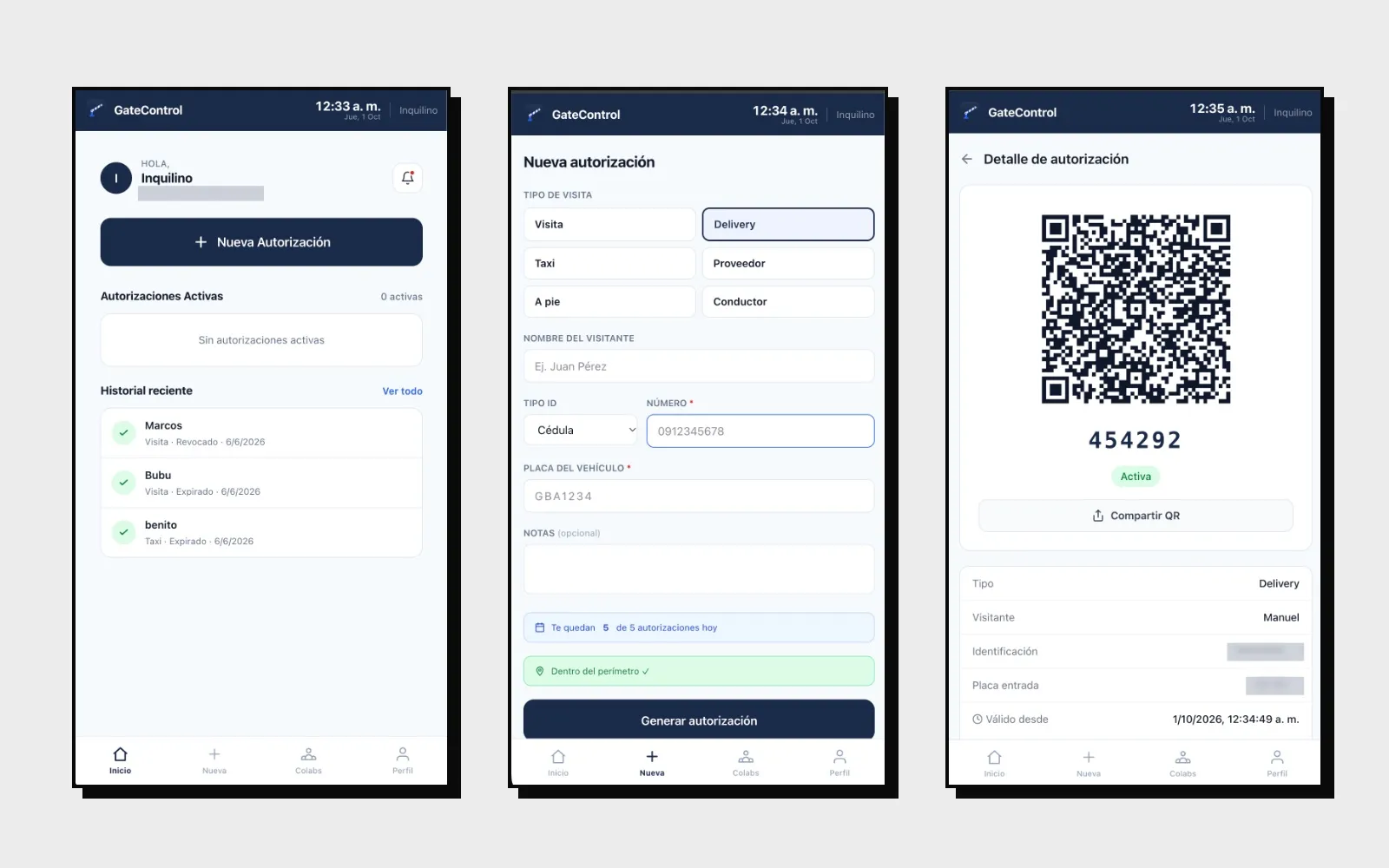
- Resident PWA: installed on the phone. With it, residents pre-authorize visitors, taxis, deliveries and suppliers, share the QR by messaging and check their history.
- Gatehouse app: the guard scans the QR with the phone camera, or types the numeric code, and registers the entry or exit. There is a version for phone and for computer.
- Admin panel: units and residents, guards, gatehouses, visit types, reports and the security settings.
- Staff PWA: for domestic workers, builders and other recurring visitors. The administrator approves them and their access renews automatically.
It is built with Laravel, Inertia and Vue, with roles and permissions by user type.
Geofencing
The administrator draws the community’s perimeter on a map (OpenStreetMap) and the server checks, on every action, whether the location is inside or outside.
- Resident: the app asks for location permission and doesn’t work without it. You can limit how many QR codes they generate per day in total and how many from outside the perimeter.
- Guard: can’t register accesses unless inside the perimeter, and the coordinates of each record are stored.
- Alert: if the QR was generated outside the perimeter, the guard sees it when validating it.
- Settings: the perimeter and its rules are changed from the panel.
Device biometrics
A second factor with WebAuthn and passkeys: the phone’s own fingerprint or face recognition. The server doesn’t store biometric data.
- It is enabled per residential complex and can be mandatory from the first login.
- The administrator defines how many hours pass before it is asked for again, or whether it is only asked at login.
- From the panel you can revoke a user’s biometrics or exempt them, for example a guard who uses a shared phone.
Access control and logging
- Single-cycle QR: each authorization has a unique identifier that doesn’t follow a sequence and an alternate numeric code. It goes from active to inside and to used, with entry and exit windows set by the administrator.
- Rejection reasons: revoked, already used, expired, or with the entry or exit time elapsed. The guard sees why the code isn’t valid.
- Guard shifts: without an open shift nothing can be verified or registered, and shifts close on their own after the configured maximum hours.
- Log: every access stores who registered it, when, from which device and address, the guard’s coordinates and the reason if it was rejected.
- Roles: administrator, guard, owner, tenant, resident and staff, each with their own routes. Administrators can’t enter the resident routes.
- Validations: in a taxi, driver and passenger must be different people. ID and plate are mandatory when the visit type requires them.
- Plate: vehicle data is looked up in the background and only the guard sees it.
- Audit: deleted authorizations are kept.
- Session: handled with cookies (Sanctum), and to change the password you have to enter the current one.
Status
It is my own product and is still in development. The gatehouse no longer depends on phone calls and there is a history of every entry. It works on shared hosting, with database indexes and cache to use few resources.